
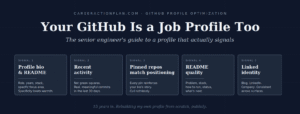
Most senior engineers I know treat their GitHub profile the way they treat a passport photo — necessary, taken years ago, hopefully not looked at too closely. GitHub profile optimization, for them, is either something they never bothered with or something they briefly Googled during a job search and forgot about.
That was me for the better part of a decade.
Here's the thought that fixed everything: your GitHub is also a job profile. Not an open-source contribution portfolio. Not a place to store hackathon side projects from 2018. A job profile, in the same category as your LinkedIn — a professional artifact that hiring managers will absolutely look at when deciding whether to move you forward.
Once you accept that framing, GitHub profile optimization stops feeling like "something for junior devs and open-source contributors" and starts feeling like what it actually is: a piece of career hygiene you can't afford to skip.
This guide is for the senior engineer whose GitHub profile has been mostly untouched for years, whose real work sits behind corporate firewalls in private repos they can't share, and who has never seriously thought of GitHub as part of the job search. That was me twelve months ago. This is what I've learned since.
WHAT THIS GITHUB PROFILE OPTIMIZATION GUIDE COVERS
- The mindset shift — why treating GitHub as a job profile (not a code dump) changes everything about how you use it
- The 5 signals hiring managers and technical recruiters actually check when they look at your profile
- The private-repo problem — how senior enterprise engineers can build a credible profile when most of their best work is inaccessible
- Templates that work — profile-level README structure, pinned repo selection, README patterns that actually get read
- How I started fresh — building a new senior-positioned profile in 2026, what I'm publishing, why
This guide is medium-length — about 20-25 minutes of reading if you go through it end-to-end. If you're short on time today, skim to Section 3 (the 5 signals) and Section 5 (the profile-level README). Those two sections carry 80% of the practical value.
5 Reasons Senior Engineers Skip GitHub Profile Optimization — and Why It Costs You
Before we get into the mechanics of GitHub profile optimization, let's name the reasons this got neglected for most of us. When you can see the reasons clearly, the fix stops feeling optional.
1. "GitHub is for open-source people"
Every article you've read about "how to build a great GitHub profile" was written by someone who contributes to open-source projects. Their advice — contribute to popular repos, get merged pull requests, star projects — doesn't map to a senior engineer whose day job is running production systems, managing incidents, or building internal platforms at a large company. So you concluded the advice wasn't for you. That was reasonable, but incomplete. There's a version of GitHub optimization that is for you. This is that guide.
2. "My best work is in private repos I can't share"
True. If you've spent 8-15 years at product companies, GCCs, or IT services, your most significant engineering work — the Kubernetes migrations, the observability rollouts, the incident tooling, the internal frameworks — is locked in company repos. You can't fork them. You can't screenshot them. You can barely talk about them in interviews. That feels like a hard wall.
It isn't. Section 4 of this guide is entirely about how to work around this problem. It's the specific challenge senior Indian engineers face more than anyone else, and it's very solvable — but not by pretending the problem doesn't exist.
3. "I'll do it when I need it"
The universal senior-engineer trap. You'll fix your GitHub profile when you're job-searching. Just like you'll fix your LinkedIn when you're job-searching. Just like you'll refresh your resume when you're job-searching. And then when the moment comes — layoff, restructure, a role you can't pass up — you'll have three weeks of catch-up work to do before you can even apply.
The correct time to optimize your GitHub profile is when you don't need it. The signals compound quietly. Recruiters and hiring managers who visit a live, actively maintained profile draw very different conclusions from those who visit a three-year-untouched one.
4. "It won't make a real difference"
This one is partly true and needs to be stated honestly. A great GitHub profile alone will not get you a job. What it will do is tilt marginal decisions in your favor. When a hiring manager is deciding between two candidates with similar résumés, the one with the live, thoughtful GitHub profile signals "engaged with the craft." The one with the empty profile signals nothing — which, in a crowded market, reads as absence rather than neutrality.
Marginal decisions decide most careers. This is one of the cheapest ways to tilt them.
5. "I don't have time for another platform"
This is the honest one. Senior engineers already juggle LinkedIn, résumé variants, blog if they write, Twitter/X if they engage there, Slack communities. Adding "meaningful GitHub presence" feels like one more content treadmill.
Here's what makes GitHub different — and easier: it doesn't need to move fast. LinkedIn rewards posting several times a week. GitHub rewards being present. A profile refreshed monthly with real commits, real READMEs, and a clear positioning statement is enough. It's much lower-frequency work than any other channel you're already maintaining.
The Mindset Shift: GitHub Is Also a Job Profile
Here's the single reframe that makes GitHub profile optimization click for senior engineers:
Most senior engineers I know still mentally file GitHub under "code storage" or "open-source thing." That framing was accurate in 2012. In 2026, it's not.
Here's what actually happens in real hiring processes right now, in India and globally:
- Recruiters check your GitHub profile before scheduling the first call, especially at product companies and GCCs. Their goal isn't to grade your code — it's to see if you're real. Is there activity? Do the repos match the résumé? Is the profile consistent with the LinkedIn?
- Hiring managers check your GitHub profile before the technical rounds. They're looking for signals about engineering taste, currency with modern tools, and whether the résumé is telling the truth about your tech stack.
- Cross-functional interviewers check your GitHub profile before the panel round. Product managers, design leads, and even executives sometimes glance at it as a way of building context before meeting you.
In every one of these cases, the profile is being used as a professional artifact — same category as your LinkedIn, your résumé, your blog if you have one. Not as an open-source contribution portfolio.
That's the mindset shift. Once you accept that GitHub is a job profile, the goal of GitHub profile optimization becomes clear: signal, consistently and credibly, what you actually do as an engineer. Not what you might contribute to open source someday. Not what side projects you built in college. What you do, right now, at your level of seniority.
The 5 Signals Hiring Managers Actually Check
I've spent time asking hiring managers, engineering directors, and technical recruiters what they actually look at on a candidate's GitHub profile. The answers are surprisingly consistent — and different from what most guides tell you.
These are the five things that move the needle, ranked by weight.
Signal 1The profile-level bio and README
This is what loads first when someone lands on your profile page. It's the equivalent of the "headline" on LinkedIn — 220 characters that shape everything downstream. A strong senior-engineer bio names your role, your years of experience, your primary tech stack, and one specific edge or focus area. Weak bios say things like "Passionate developer" or "Full-stack enthusiast". Strong bios say: "Lead Platform Engineer & SRE | 14+ years shipping paved roads on AWS EKS + ECS Fargate | Building AI infra references." Specificity beats warmth every time.
Signal 2Recent activity — but not the green squares
Most guides tell you to chase the "green contribution graph." That's the wrong metric. Hiring managers don't count squares — they scan for recent activity. A single commit in the last 30 days signals a live profile. Three commits in the last week signals engagement. Fifty commits every day looks performative and, at senior level, is actually a red flag ("what is this person actually shipping at work?"). Quality of recent activity matters more than quantity.
Signal 3Pinned repositories that match your positioning
GitHub lets you pin six repositories that appear on your profile page. This is prime real estate. Every pinned repo should reinforce the story your bio tells. If you're positioning as a Platform Engineer, your pinned repos should look like Platform Engineering work — Terraform modules, Kubernetes manifests, infrastructure references, tooling. If half your pinned repos are old JavaScript tutorials from 2019, you're actively working against your own positioning. Cull ruthlessly.
Signal 4Repo README quality
When someone clicks into one of your pinned repos, the README loads first. A repo with a proper README — describing the problem, tech stack, how to run it, what's in progress — signals engineering communication skills, which are exactly the skills senior engineers are hired for. A repo with just code and no README signals the opposite. Empty READMEs are worse than no repo at all.
Signal 5Linked professional identity
Your profile should link out to your LinkedIn, your personal blog if you have one, and your current company. Consistent identity across platforms signals a professional you can find, verify, and reference. Missing links create small friction — and small friction is enough to lose a marginal callback in a competitive market.
Notice what's not on that list: star counts, followers, number of contributions, whether you have a "For Hire" badge. Those are vanity metrics that recruiters have learned to ignore. The five signals above are what actually shift the read of your profile from "abandoned" to "alive."
The Private-Repo Problem — and How to Solve It
Here's the honest challenge for senior Indian engineers: most of your best professional work lives in private company repositories you can't clone, fork, or share. Terraform modules you built at your last company are their IP. Kubernetes controllers you wrote for internal platforms are their code. Incident-response tooling you shipped for on-call is their operational knowledge. The list goes on.
So how do you build a credible GitHub profile when the best evidence of your work is inaccessible?
Three strategies, in order of effort and payoff.
Strategy 1: Reference implementations of your real work
You can't publish the actual Terraform module you wrote at your previous employer. You can publish a reference implementation of the same pattern, written from scratch on your own time, generalized so it doesn't leak anything proprietary. Same skill demonstrated. Same technical signal. Zero legal risk.
This is the strategy I'm using for my own profile. My repo paved-road-ai-eks is a reference for the kind of paved-road platform work I do for AI workloads on EKS. Same shape as production work. Written from zero, in public, on my time. It doesn't reveal anything about any employer, but it signals — clearly and specifically — what kind of engineer I am.
Strategy 2: Small tools and utilities you use daily
Every senior engineer has built small utilities to make their own life easier — a script that parses a specific log format, a CLI wrapper around a tool you use daily, a Makefile that automates a workflow you run every week. These are usually small, non-proprietary, and safe to publish. Individually they seem trivial. In a pinned-repos display, they collectively signal "this is someone who ships and automates."
Strategy 3: Learning-in-public projects
Something you're currently learning — a new tool, a new pattern, a new area — that you're documenting as you go. My planned IPv4-to-IPv6 migration project is exactly this: a real problem I'm working through, published in public with notes, decisions, and rough edges included. This is powerful because it signals two things at once — currency (you're learning the newest thing) and honesty (you're publishing the messy middle, not just polished outputs).
Between these three strategies, you can build a pinned set of 4-6 repositories that legitimately represent what you do — without ever touching your employer's IP. That's the private-repo problem solved.
The Profile-Level README — Your GitHub Bio, Fully Written
GitHub has a quiet feature that most people don't know about. If you create a repository whose name exactly matches your username, its README file will render on your profile page — above the pinned repos, right at the top. This is the single highest-impact piece of real estate in GitHub profile optimization, and most senior engineers don't even know it exists.
Here's what it looks like when it works: someone lands on your profile, and instead of seeing a bare username and a wall of repos, they see a proper professional introduction — who you are, what you do, what you're working on, what you're learning. Set up correctly, this converts a passive profile visit into an active read.
Structure that works for senior engineers
- A one-line professional summary — the same or an expanded version of your bio
- What you do — 2-3 lines about your current role, focus area, tech stack
- What you're currently working on — 2-3 bullets pointing to specific in-progress repos or areas
- What you're currently learning — a short, honest section about where you're deepening skills
- Where to find you — links to blog, LinkedIn, personal site
Notice what's not there: a life story, hobbies, favorite quotes, "coffee ☕ enthusiast" nonsense. Senior engineers reading other senior engineers' profiles want signal, not personality performance. Keep it professional. Keep it specific.
A working template you can adapt
Lead Platform Engineer & SRE | [X] years shipping [primary specialty] on [primary stack].
## What I do
I currently work at [Company] as a [Role], focused on [specific area — e.g., "reducing incident MTTR across our EKS fleet"]. My day-to-day is somewhere between [Area 1] and [Area 2] — [one line about your specific angle].
## What I'm currently building
- [Repo Name 1] — [one line describing what it is]
- [Repo Name 2] — [one line describing what it is]
- [Repo Name 3] — [one line describing what it is]
## What I'm currently learning
[2-3 lines about the specific things you're deepening in — e.g., "Deepening my knowledge of eBPF for observability. Working through the practical implementation on the paved-road-ai-eks reference. Notes in the /learning folder."]
## Where else to find me
- Blog: [your blog URL]
- LinkedIn: [your LinkedIn URL]
- Reach out: [preferred contact method]
// Keep this file evergreen. Update quarterly.
Fill this in with your specifics, commit it to a repo named exactly your username, and the README will start rendering on your profile page. Total time: about 45 minutes for a first draft. Ten more minutes each quarter to keep it current.
The Pinned Repos — Your Six Slots
GitHub lets you pin up to six repositories. Use all six. These are the projects that visually anchor your profile below the README, and they carry proportionally more weight than any repo in your full list.
How to choose your six
Two rules govern which repos deserve a pin.
Rule 1: Every pin reinforces your positioning
If your bio says "Platform Engineer & SRE," every pinned repo should look like platform or SRE work. Terraform. Kubernetes manifests. Infrastructure references. Observability configs. On-call tooling. Anything that reinforces the story. If you pin a JavaScript tutorial from your college days alongside serious infrastructure work, the message gets muddled. A confused profile is worse than a sparse one — cull ruthlessly.
Rule 2: Each pinned repo has a real README
An unpinned repo with a bad README doesn't hurt you much — nobody sees it. A pinned repo with a bad README actively hurts you because it's the first thing hiring managers click into. If you can't write a proper README for a repo yet, don't pin it. Pin four solid repos and leave two slots empty rather than pin six repos with two broken READMEs.
Ideal composition for a senior engineer's pinned set
- 1-2 reference implementations — the "here's how I do X" repos that mirror your day job at a safe abstraction level
- 1-2 learning-in-public projects — things you're currently working through, published as you go
- 1-2 tools or utilities — small but useful things you've built and actually use
- 0-1 external contribution or notable fork — if you have one that genuinely showcases your work; skip if you don't
Empty slots are fine. Nobody counts them. A profile with four thoughtfully pinned repos reads much stronger than one with six random ones.
Repo READMEs That Actually Get Read
The README is the first — and often only — thing anyone reads about a repo. Most engineer READMEs are auto-generated boilerplate that says nothing. A proper README for a portfolio-quality repo takes twenty minutes to write and completely changes how the repo is perceived.
The five elements every repo README should have
- One-line summary at the top. What is this repo? Not a marketing pitch — a plain-English description a hiring manager can understand in 5 seconds.
- The problem being solved. Two or three lines about why this exists. What real problem does it address?
- The tech stack. A brief list of what's used and why. This is often the section hiring managers scan hardest — they're mapping your repo to their tech stack.
- How to run it (or read it). If it's runnable, install and run steps. If it's a reference implementation not meant to run, a note about what to read and in what order.
- Status and what's next. Is this complete? Is it work-in-progress? What are you planning to add? This section makes the repo feel alive rather than abandoned.
Keep the whole README under 300 words for a small repo, under 800 for a larger one. Anything longer stops being read and starts being scrolled.
The Commit Cadence Question
How often should you commit? This is the question most senior engineers get stuck on, and it's why so many profiles stay untouched.
Here's the honest answer: less frequently than you think, more consistently than you're doing now.
What "healthy" looks like
- 2-4 real commits per month is a solid senior baseline. Real means substantive — not just typo fixes to game the graph, but actual meaningful pushes.
- 1 significant push per week is strong. Signals engagement without looking performative.
- Daily commits at senior level often reads as "what are you actually shipping at work?" — it can backfire. The exception is if you're actively learning or building something in public, where daily commits make narrative sense.
- The one thing you avoid is going three months without a commit. That's when a profile visibly slides from "alive" to "abandoned." Even one small, real commit per month keeps it on the alive side of the line.
The typo-fix trick — and why it's fine
Some purists will tell you not to make small commits just to keep the graph green. Ignore them for the senior-engineer use case. A README typo fix, a small dependency bump, a comment added to clarify something — these are legitimate maintenance commits, and they keep your profile signal alive during weeks when you're too busy at work to push meaningful features. Do these. Just don't fake them — make sure each one is a real change worth making.
My Story — Starting Fresh at 15 Years In
My old GitHub profile is exactly what I described at the top of this guide — a decade-old account, flooded with generic tutorials, hackathon leftovers, and half-abandoned side projects that haven't been touched in three years. Some solid work is in there. Most of it isn't. And the overall signal, when a hiring manager lands on it, is not the signal I want to send at fifteen years of experience.
So in July 2026, I did something a lot of senior engineers eventually consider but rarely act on: I started a completely fresh profile. arvind-platform-eng. Different account, clean slate, senior-positioning from the first commit.
The bio names exactly what I do now — Lead Platform Engineer & SRE, paved roads on AWS EKS + ECS Fargate, building AI infrastructure references. Not what I did ten years ago. Not what I might be interested in someday. What I actually do this year.
The first repo I published is paved-road-ai-eks — a Terraform-based reference for platform engineering patterns applied to AI workloads on EKS. It's the shape of the work I do at scale in my day job, generalized and rebuilt from scratch so nothing about my employer leaks. Real signal, zero legal risk.
Next up is an IPv4-to-IPv6 migration reference I'm working through publicly. Nobody in Indian tech is publishing serious content on IPv6 migration for platform teams. It's a real problem, currently underserved, and exactly the kind of "learning-in-public" project that signals both currency and honesty.
The point isn't that everyone needs to start a second account. Most people don't. If your existing profile is close to fixable — a solid bio, some work worth pinning, a few READMEs to rewrite — fix it in place. But if you look at your current profile and can't imagine sending a hiring manager to it without cringing, a fresh start is a legitimate option. I chose it, and I'm glad I did.
The GitHub-LinkedIn-Blog Trinity
The final piece of GitHub profile optimization that most guides miss: your GitHub doesn't exist alone. It exists as one leg of a three-part professional presence — LinkedIn, GitHub, blog (if you have one). Each leg reinforces the others, and misalignment between them signals confusion.
What alignment looks like
Same positioning across all three
If your LinkedIn says "Senior SRE" and your GitHub bio says "Full-Stack Developer," a hiring manager visiting both will be confused about who you actually are. Confusion loses interviews. Pick your positioning, apply it consistently across all three surfaces. Even the phrasing should feel like the same person wrote all of it.
Cross-linking that closes the loop
Your LinkedIn should link to your GitHub and blog. Your GitHub profile README should link to LinkedIn and blog. Your blog author bio should link to LinkedIn and GitHub. This creates a small closed loop — a hiring manager who lands on any surface can navigate to the other two, which builds credibility passively.
Content overlap where it makes sense
If you write a blog post about a technical topic, the associated code can live in a GitHub repo you link from the post. If you build something on GitHub worth talking about, a LinkedIn post about the decisions you made can drive readers back to the repo. Each channel amplifies the others — but only if the underlying identity is consistent.
Once the trinity is in place, your professional footprint compounds. A recruiter searching for you finds a consistent story across three platforms. A hiring manager doing due diligence finds signal on every surface they check. A curious engineer who liked one of your posts can follow the trail across surfaces and become a long-term follower.
A Word Directly to You
If you've read this far and you're a senior engineer with a stale GitHub profile, here's the honest version of what I'd say to you if we were talking one-on-one.
You don't need to become an open-source contributor. You don't need daily commits. You don't need a hundred stars on your best repo. What you need is a profile that, when a hiring manager clicks through from your résumé, doesn't undo everything the résumé worked to establish.
Set aside one Saturday morning. Three or four hours. Write your profile bio properly. Set up the profile-level README with the template above. Pick four to six repos worth pinning, and if you don't have them, publish two small reference implementations of work you actually do. Write real READMEs for each. Link out to your LinkedIn and blog.
That's it. That's the ninety-percent version of GitHub profile optimization for a senior engineer. Iterate from there quarterly. Small, consistent, professional.
And if you're in the same place I was — a decade-old profile that no longer represents you at all — don't be afraid to start fresh. It's not "cheating." It's honesty. Your career at fifteen years in is a different career from what your account showed at five years in. The profile should reflect who you are now.
The work compounds quietly. Six months from now, when a recruiter clicks through or a hiring manager does their due diligence, they'll find something real. Not viral. Not impressive by open-source metrics. But real. Alive. Consistent with the story your résumé tells.
That's what tilts marginal decisions. That's what this is about.
— Arvind
Quick Reference — GitHub Profile Optimization Framework
The Mindset
GitHub is a job profile. Read like a résumé. Filtered like a résumé. Judged like a résumé. Treat it that way.
The 5 Signals Hiring Managers Check
- Profile-level bio and README
- Recent activity (not green squares — real commits)
- Pinned repos that match your positioning
- README quality on every pinned repo
- Linked professional identity (LinkedIn, blog, company)
The Private-Repo Problem — 3 Solutions
- Reference implementations of your real work
- Small tools and utilities you use daily
- Learning-in-public projects, published as you go
Profile-Level README Structure
One-line professional summary → What you do → What you're building → What you're learning → Where else to find you. Update quarterly.
Pinned Repos
4-6 slots. Every pin reinforces positioning. Every pin has a real README. Empty slots are fine.
Commit Cadence
2-4 real commits per month is a solid baseline. 1 significant push per week is strong. Avoid three-month silences.
The Trinity
Same positioning across GitHub, LinkedIn, blog. Cross-link between all three. Content overlaps where natural.
About Arvind Kumar: I'm a Lead Platform Engineer & SRE with 15+ years in Indian tech, most of it in DevOps, SRE, and infrastructure. This GitHub profile optimization guide is what I've learned while rebuilding my own presence from scratch at fifteen years in. You can follow the profile in real time at github.com/arvind-platform-eng — including works in progress, rough edges, and the reference implementations I'm building in public.
Related reading: The 45-Day Layoff Recovery Guide India · Why Recruiters Aren't Calling You Back · DevOps vs SRE vs Platform Engineering in 2026